What's new in Pixotope 26.2
We shipped Pixotope 26.2 over the summer. With our software live on air at events around the world. No fanfare, no downtime.
That's not an accident. It's what happens when a release is built around what designers, engineers and operators actually tell us they need: more control, fewer surprises, and software that holds up when the show can't wait. Pixotope enables virtual with confidence.
TL;DR: Pixotope 26.2 adds routing failover for live reliability, a browser-based Live controller for on-air operation, per-machine-group camera switching for XR/AR, Upgraded Artist with Video routing, a rebuilt Diagnostics that runs without admin rights, and network install from inside Director.
Introducing Live Controller
Live Controller is our new browser-based application for operating graphics during a live broadcast.
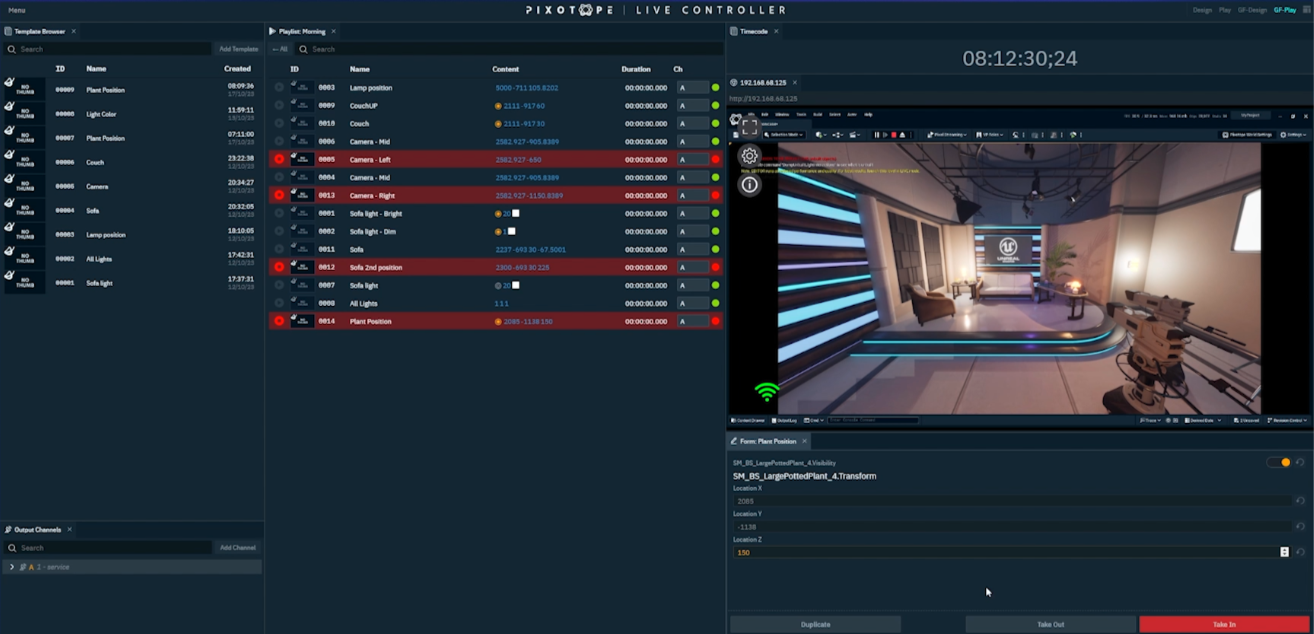
Browser-based is the first thing worth noting: there's nothing to install on the operator's machine; it runs from anywhere on your network, and multiple operators can work at once.
It's built around a template system. A graphic designer builds templates from Pixotope levels - the scenes built in the engine - ahead of the show; a production operator runs them during the show without touching the engine directly.
Templates cover XR, VS, and AR, and use a live engine property browser, allowing the operator to bind any engine property or function to a form field. There's no requirement to pre-expose properties - the full object tree for a level is accessible at runtime.
If you've worked with systems that force a designer to decide upfront which properties an operator will ever touch, this is different.
Each template carries its own metadata, configurable In and Out actions, and an operator form whose parameters can be shown, hidden, and reordered.
During a show, the operator works across purpose-built panels:
- a template browser, and one or more playlists of template instances
- the operator form, for entering and modifying data live
- a live WebRTC preview that automatically follows the selected instance's output target, switching between machines as needed so the operator always previews the right engine
- per-channel Take In / Take Out controls, with Take Out All across channels
- A Web page panel that embeds Director panels, Control panels, or any other embeddable web page, so existing dashboards and tooling sit alongside the playlist
Instances always show their current on-air status. Two layout presets ship by default — Design for setup, Play for operation — and operators can save their own.
If you run a studio where different people build the graphics and take them to air, this fits cleanly into that workflow.
UPGRADED ARTIST
Every Pixotope subscription has always included Artist licenses for technical artists and scene designers who work in the Pixotope Editor.
With 26.2, those licenses get a significant boost - same name, more capability. All existing Artist licensees are automatically upgraded, free of charge, to a more powerful version of the Artist license that adapts to how artists actually work.
Full video I/O when you need it. Route a video source, and the Artist license enables full video I/O for production testing, with a watermarked output reserved for non-broadcast use.
Clean viewport for pure scene design. When no video inputs or outputs are routed, the Editor viewport runs without a watermark, giving tech artists the full, unobstructed Editor experience for modeling, lighting, and layout work.
Director’s perspective validation, anywhere. Combined with Pixotope's Record & Playback feature, artists can replay studio camera moves with tracking data on any machine - at the office, at home, or on location. Compositions and blocking can be validated against the actual planned camera moves, not just from a modeling standpoint.
Creative Flexibility. The upgraded Artist license turns every Pixotope subscription into a more flexible platform for the people who build the scenes, enabling design, iteration, and validation wherever the work needs to happen, without compromising the integrity of live-broadcast output.
HDR Color matching
Pixotope Color Matching now includes HDR range samples, so you calibrate HDR workflows against reference samples rather than by eye. The Engine Working Color Space can also be switched from within Director, rather than being fixed at a lower level.
If any part of your delivery is HDR, calibration becomes more consistent.
Video IO: audio mixing and stream color
VideoIO adds an AJA audio-mixing option, and the color profile for the WebRTC stream can now be changed. If you mix audio through AJA hardware or send a stream over WebRTC, both are now under your control rather than upstream.
Camera switching per machine group
Cameras are organized into target groups (camera sets assigned to a machine group, or slice), which you can add, remove, and swap directly from the Director UI.
If your setups are simple, you may never have hit the limitation. If you run multi-slice or mixed AR/XR architectures, you've probably worked around it more than once.
Pixotope Routing failover
Our Routing failover lets you transfer routing from a disconnected machine to a connected one. When a machine drops mid-show, you recover without a full reconfiguration. Render groups now appear as inline text buttons when none is selected, and there's a Ping server machine button in Director for when a client loses connection. That may not be glamorous, but you will appreciate them when you need them (at the worst possible moment).
Quality-of-life fixes that our users asked for:
-
Keyer Initialize and Update buttons that stay in sync with the actual Keyer state
-
Chroma Keyer settings that travel with an imported camera or media input
-
Saveable, recallable tracking offset and delay presets, triggerable from the Control Panel
-
LED mapping bodies and 2D media that report coordinates and size as you move them, and respond to the keyboard
-
Clearer license-count display, to prevent accidental multi-selection
This release spends most of its weight on features that decide whether a system survives a real show in a real facility. If that's the lens you use to evaluate your next virtual production platform, take a closer look at Pixotope.

COMMENTS