.png?width=300&name=Pixotope%20-%20ProductRelease_Halo_Templates_linkedIn%201200%20x%20627px%20(5).png)
We've just released Pixotope 25.3, and it's focused on something simple: making complex productions less stressful and more efficient.
If you're running multi-camera AR setups or large XR LED volumes, you know the pain points. Hardware fails mid-broadcast. Artists need studio time just to test ideas. Every engine needs manual syncing. Tracking systems don't talk to each other.
This release addresses those problems directly.
Automatic Failover for XR: Because Hardware Will Fail
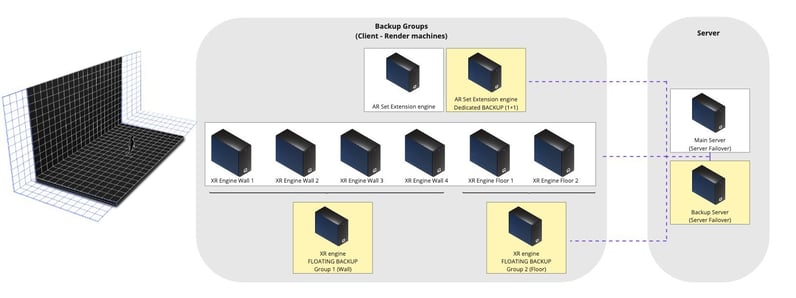
Complex XR setups involve multiple render machines, and hardware failures happen. A GPU overheats, a network cable gets bumped, an engine crashes.
In previous workflows, that meant either having a dedicated backup for every single machine (expensive) or accepting downtime during your broadcast (unacceptable).
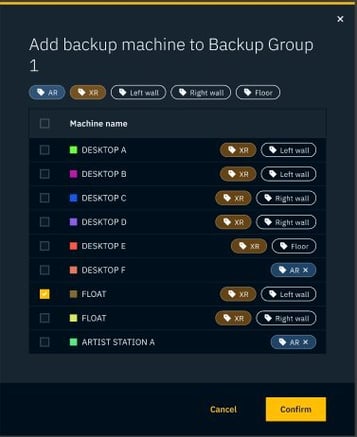
Pixotope 25.3 introduces intelligent N+1 redundancy. Configure a group of main render machines and one floating backup machine that automatically covers any failure in that group. Route through your Blackmagic Videohub, and if any engine goes down - whether it's hardware, software, or network - the backup takes over instantly.
All live changes and group overrides stay perfectly synchronized.

What this means for your production:
No operators in panic, no drop in your broadcast. The backup machine replaces the failed unit while you troubleshoot the issue.
You can run bulletproof XR workflows without doubling your hardware budget. One backup covers multiple machines. That's smarter redundancy, and it's cost-effective reliability for high-stakes broadcasts.
Live Editor Broadcasting: Real-Time Changes Across Every Engine
Imagine you're running a 10-camera AR sports broadcast or a 30-engine LED wall for a virtual event.
Your lighting artist spots an issue with a virtual light and it's creating an unwanted shadow on talent. In traditional workflows, fixing that requires stopping, adjusting, resyncing, and hoping the change propagates correctly to all engines.
Live Editor Broadcasting eliminates this entire workflow.
Your artists work in the Pixotope Editor - the same interface they already use for scene building. They move that virtual light. The change propagates instantly to every connected render machine in your network, whether it's 2 engines or 40.
What you see in the Editor is exactly what appears on every output: without sync delays, configuration issues or wondering if Camera 12 got the update.
This simplifies live production iteration. Set designers, lighting artists, and visual directors can make adjustments on the fly without breaking creative flow. Director's adjustment panels remain excellent for targeted operator tweaks, but for comprehensive creative work across multi-machine setups, Live Editor Broadcasting is a significant leap forward.
What this means for your production:
Faster iterations during rehearsal and live shows. Your creative team maintains momentum because they're not waiting for technical sync processes. Changes happen in real-time, everywhere, always.
Record & Playback: Creative Freedom Beyond the Studio
Studio time is expensive. Tracking systems need setup and calibration. But much of the creative work such lighting adjustments, set design, shot blocking - can now happen wherever your team works best.
Capture your camera input complete with tracking information during rehearsal or a test session, then play it back anywhere: on a laptop at home, at the office, on a different machine.
Artists can now work on scenes, test lighting setups, and refine compositions without tying up your tracking system or studio space. When you do book studio time, you're executing a plan that's already been tested and refined.
This is particularly valuable for troubleshooting complex setups. Reproduce an issue offline in a controlled environment rather than diagnosing it under the pressure of live production schedules.
What this means for your production:
Maximize your expensive studio hours by front-loading creative iteration. Your team arrives at the studio with confidence because they've already worked through the details.
Unreal Engine 5.7.1 and Motion Design Production Ready
Pixotope 25.3 upgrades to Unreal Engine 5.7.1, which brings Motion Design to full Production Ready status.
This is a major milestone for broadcast graphics workflows, with Epic hardening the toolset based on real customer feedback.
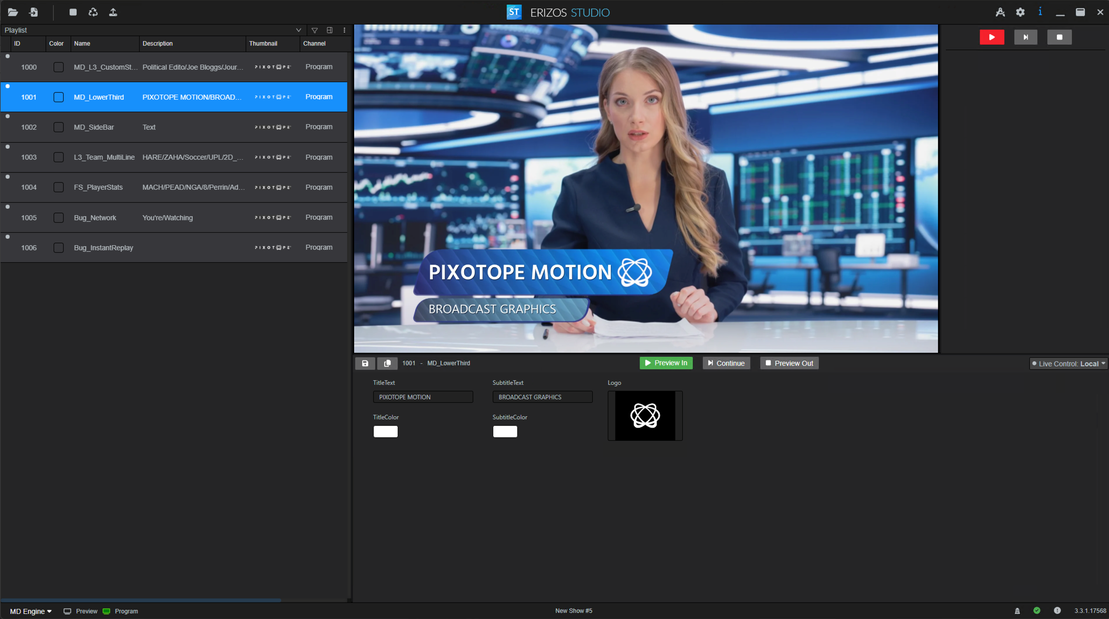
We've also renamed Pixotope CG to Pixotope Motion, aligning our approach with Epic Games' toolset and workflows. This includes full support for remote control preset controllers, transition logic trees, and state machines. The result is a cleaner, more streamlined workflow for importing designs from Unreal into Pixotope, with faster reflection of changes.
Creating templates, building rundowns, adding show UIs, and integrating with NRCS and automation is handled through Erizos Studio.
Performance improvements include MegaLights moving to Beta with directional light support and Niagara particle lights, Substrate materials reaching production-ready status with advanced layering capabilities, and the Procedural Content Generation Framework achieving nearly 2x performance over UE 5.5.
For text-based graphics, Text3D now supports rich text styling with inline editing, dramatically reducing actor counts and setup complexity.
Each text section can be exposed to Remote Control for individual customization which is perfect for tickers, lower thirds, and dynamic graphics.
OpenTrackIO: Industry-Standard Tracking That Actually Works Together
The broadcast industry has a vendor lock-in problem, especially with tracking systems. Proprietary protocols mean you're stuck with specific hardware combinations, and integrating solutions from different manufacturers becomes a custom development project.
Our 25.3 release adds support for OpenTrackIO, the new SMPTE standard for tracking data exchange.
As active contributors to developing this protocol alongside industry partners, we're supporting the industry's shift toward true interoperability.
With OpenTrackIO, you have real flexibility in choosing and configuring tracking solutions. Systems from different vendors can communicate using a standardized protocol, which means better integration, easier troubleshooting, and actual choices when building your production infrastructure.
What this means for your production: Less vendor lock-in, more flexibility, and infrastructure that can evolve as better solutions emerge without requiring a complete rip-and-replace.
More Hardware Options: Matrox SDI Support
Speaking of flexibility, Pixotope 25.3 now supports Matrox SDI cards for video I/O. This expands your hardware options when building or upgrading production systems, with the same reliability you expect from Pixotope's video pipeline.
More choices mean you can optimize for cost, availability, or specific technical requirements for your facility.
Why This Release Matters
Our 25.3 release isn't about flashy new features for the sake of marketing bullet points. It's about addressing the actual friction points in complex broadcast workflows.
If you're currently stuck with older solutions that can't scale, can't fail gracefully, or can't adapt to modern production demands, Pixotope 25.3 offers a path forward and is available now.
Check the full release notes for detailed technical documentation, migration guides, and implementation details.

COMMENTS